The web cockpit for end users
A web portal shaped by your organizational structure.
Secured by your access rights.
ROK provides end users with a single web portal to access their tasks, launch procedures, consult documents, track their activity and work with the right context at all times.
Views, resources and available actions are automatically adapted to each user's roles, responsibilities and access rights,
without installation.

Processes are modeled
But execution often remains fragmented
In many organizations, processes are well designed from a business perspective, but end users still have to navigate between multiple tools: emails, files, forms, applications, dashboards and internal requests.
What happens without a unified portal |
1
Tasks are scattered across multiple tools.
2
Priorities are not always visible.
3
Important documents are difficult to find.
4
Context is missing when action is required.
5
Procedures start from different entry points.
Follow-up still relies on manual reminders.
What happens with ROK. |
1
Tasks are consolidated in a single workspace.
2
Users know what to do, when, and with what information.
3
Documents and resources remain linked to activities.
4
Activity becomes visible, prioritizable, and traceable.
5
Procedures are accessible in just a few clicks.
The experience remains simple, even for complex processes.
Modelers design. End users execute. Simply.
A clear experience,
even when processes are complex
The ROK web portal does not expose the platform’s complexity. It provides each user with a clear interface to act, track progress and collaborate without getting lost.
I know what to do
Clear, prioritized tasks with status, deadlines and relevant information
I have the context at hand
Case file, documents, role, procedure and related information all in one place.
I have nothing to install
Everything runs in the browser, on desktop, tablet or mobile.
I launch and track
A procedure can be started in one click and followed through to completion.
I can find everything
History, traceability and completed actions remain accessible without searching.
I collaborate faster
Clear organization, the right contacts and fewer back-and-forth exchanges.
One web portal
All activity in one place
ROK simplifies daily execution by bringing together tasks, applications, procedures, documents, resources, organizational chart and indicators in an interface accessible from the browser.
Understand before you execute:
Explore a procedure, its roles and resources before launching it.
Before executing a procedure, users can review the complete process: workflow diagram, roles, documents, software, description and planned tasks. They gain a better understanding of what they need to do and what comes next.
✓ Procedure workflow diagram.
✓ Involved roles.
✓ Planned tasks.
✓ Required documents.
✓ Associated software and resources.
✓ Process description.

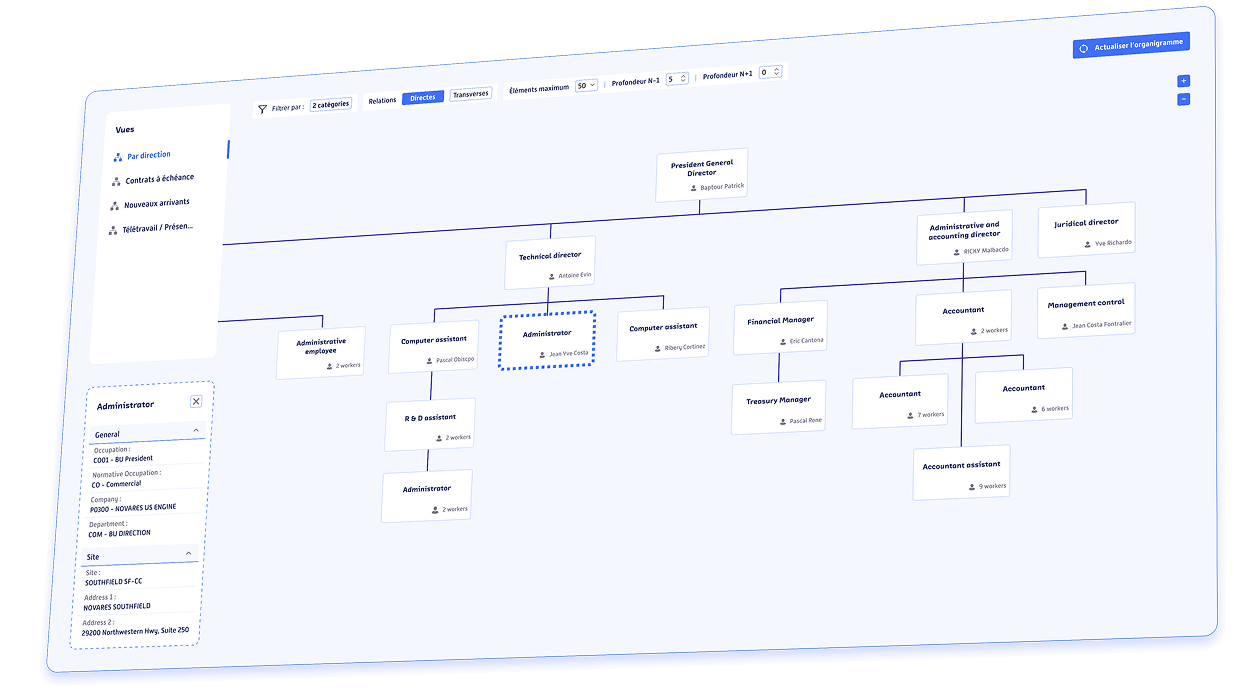
Visualize the organization in real time:
An interactive, readable and actionable web organizational chart.
Authorized users can navigate through configured organizational views: site, entity, scope, position or team. They can identify the right contacts and rely on the organizational structure to streamline day-to-day processes.
✓ Explore the organization by scope.
✓ View positions, employees and reporting lines.
✓ Identify the right contacts.
✓ Understand responsibilities.
✓ Adapt the display to your needs.
✓ Launch or follow organization-related processes.
Your personal dashboard:
An instant view of your activity and workload.
The Overview tab centralizes the key indicators you need every day. Users can quickly see what is accumulating, what is progressing and where to focus their attention, without opening multiple tools.
✓ To-do tasks.
✓ Completed tasks.
✓ Recent activity trends.
✓ Activity by application.
✓ Operational priorities.
✓ Workload and key attention points.

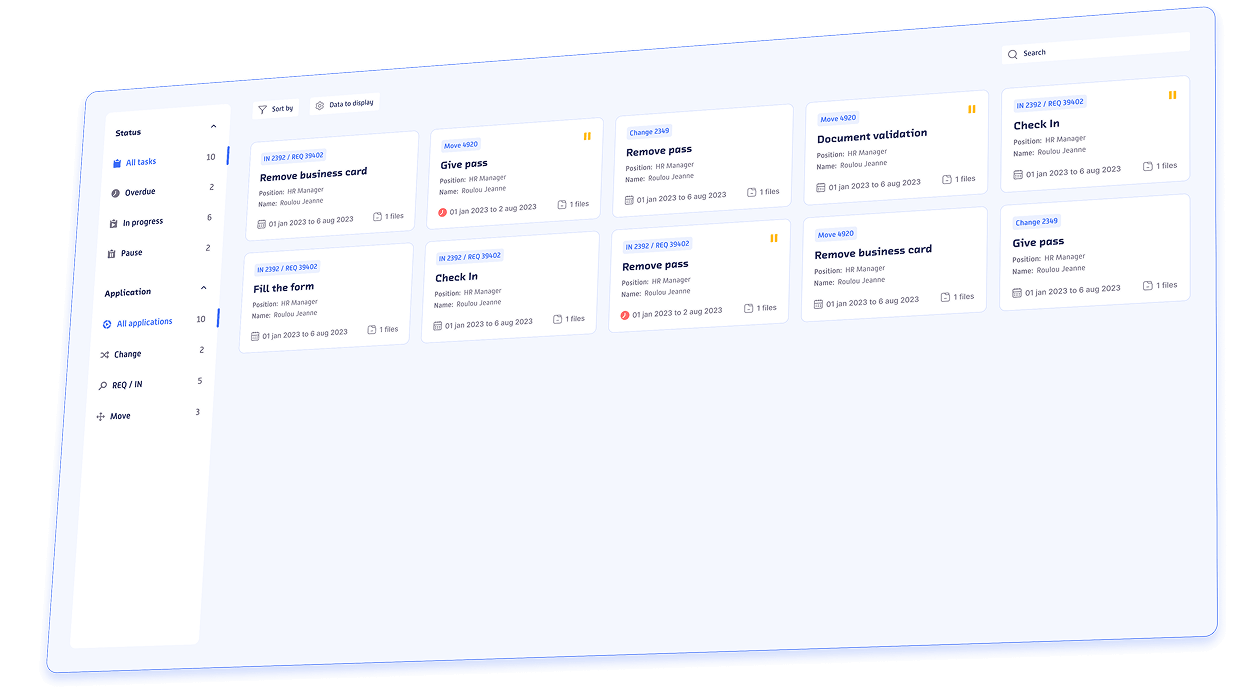
Execute without wasting time:
All your active tasks, filterable and ready to be processed.
ROK brings together tasks generated by launched applications in a single place. Users can filter, prioritize and process each task with the relevant context at hand.
✓ View active tasks.
✓ Identify overdue tasks.
✓ Filter by application or status.
✓ Prioritize urgent actions.
✓ Access the context of each task.
✓ Process tasks directly from the portal.
Launch an application in one click:
Starting the associated workflow is as simple as selecting a tile.
The Applications tab displays the applications available according to the user's role, along with their recent activity. Users select an application, launch the associated workflow, and then track their activity from the same workspace.
✓ Applications available based on role.
✓ Recently launched applications.
✓ Completed applications.
✓ Shortcuts to frequently used applications.
✓ Usage indicators.
✓ Immediate follow-up after launch.

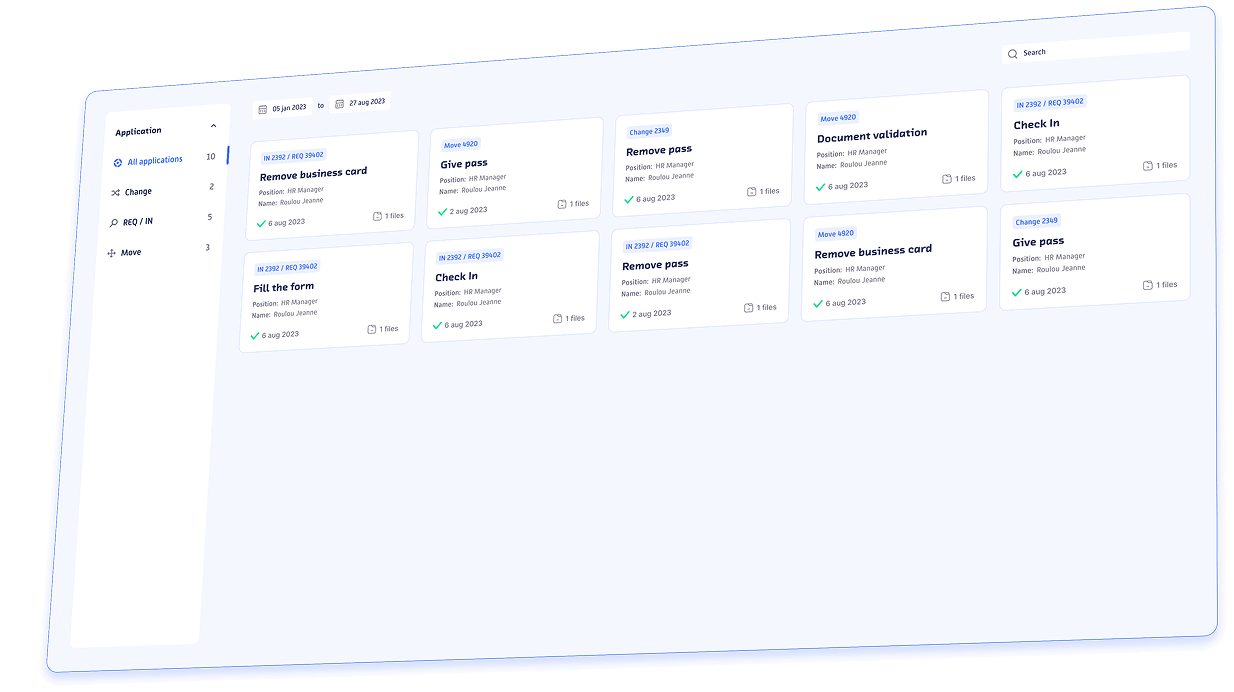
Find everything easily:
Clear access to completed tasks.
The History tab provides a structured view of completed tasks. Users can see what has been done, verify an action or justify an approval without digging through their emails.
✓ Find completed tasks.
✓ Filter by application or period.
✓ Verify execution dates.
✓ Track completed actions.
✓ Justify a decision or approval.
✓ Strengthen operational traceability.
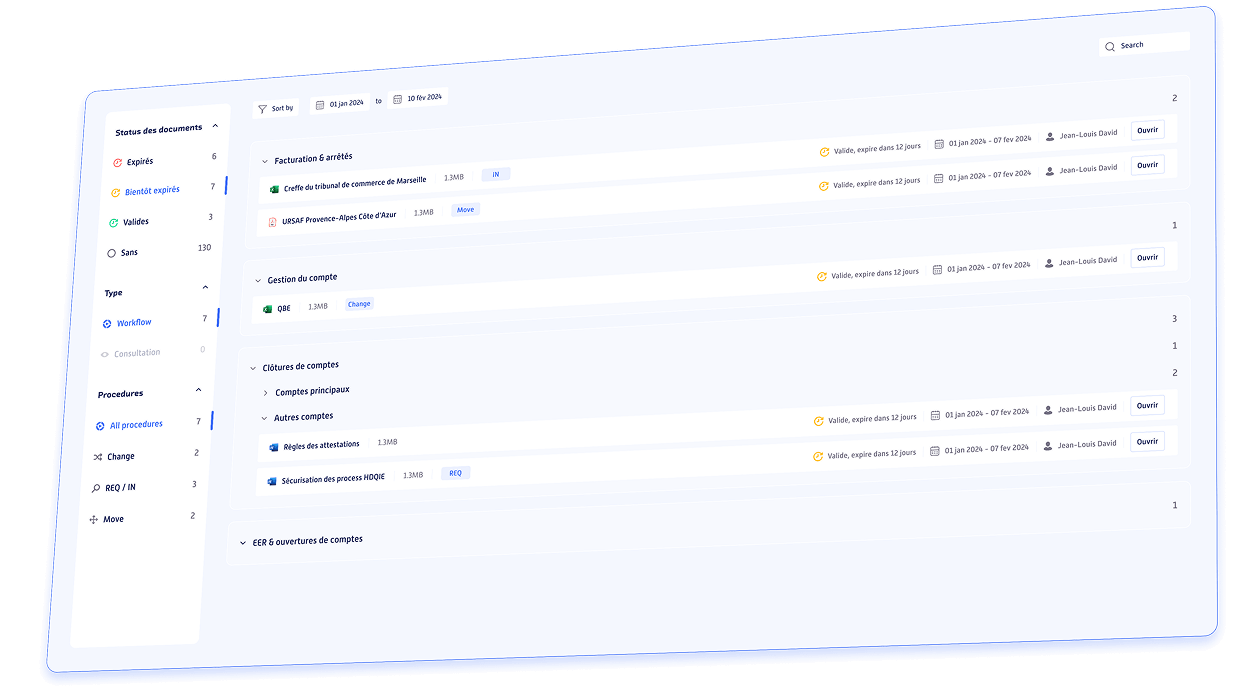
The right files at the right time:
Search, filter and open documents related to your activities.
The Documents tab centralizes files linked to applications as well as documents available for consultation. Users can quickly filter, sort and open the right document at the right time.
✓ Documents linked to applications.
✓ Documents available for consultation.
✓ Document validity status.
✓ Document or usage type.
✓ Association with a procedure.
✓ Direct access through the portal.
After design,
execution becomes simple
The ROK web portal bridges the gap between the applications designed in the platform and the users who execute them every day.
Every action is contextualized. task is visible. resource remains accessible.
Less operational friction
Fewer reminders, fewer errors and smoother execution.
Fewer scattered tools
A single entry point to prevent information loss and unnecessary back-and-forth.
Faster decisions
Context is immediate, actions are more direct and approvals are easier.
Monitoring and traceability
Activity is visible, history is actionable and tracking becomes simpler.
More natural adoption
The journey is clear, the language is practical and the interface is tailored to end users.
Smoother collaboration
Roles, responsibilities and stakeholders are clearly visible.
Show us your users' daily work.
We'll show you how ROK simplifies it through a single web portal.
The web entry point
to the entire ROK ecosystem
Understand how the ROK web portal simplifies the daily execution of tasks, procedures, documents and workflows through a single interface.

Living Org Chart
Roles, positions and responsibilities define what each user can see and do.

Hyper automation
Business applications created in ROK become accessible and executable from the web portal.

Native IGA
Access to applications, documents and resources is aligned with authorized permissions.

Team Management
Projects, tasks and decisions remain accessible in a clear, collaborative and traceable workspace.
The ROK web app transforms the platform into an everyday user experience.
ROK Decoder:
Your Questions,
Our Answers!
Understand how the ROK web portal simplifies the daily execution of tasks, procedures, documents and workflows through a single interface.
Does the ROK web portal require installation?
No. The portal is accessible through a web browser. It does not require workstation-by-workstation deployment and allows users to access their tasks, procedures and resources through an online interface.
Do all users see the same content?
No. What users see depends on their roles, permissions and responsibilities. Available views, documents, applications and actions may therefore vary according to each authorized profile.
Can the portal be accessed from mobile devices?
Yes. The experience is responsive and adapts to the intended devices: desktop, tablet or mobile.
Can users launch procedures from the portal?
Yes. Available applications and procedures can be launched directly from the web portal. Workflows created in ROK become accessible and executable by end users. To learn more, visit the No-code hyperautomation and generative AI page.
What is the difference between Applications and Procedures?
The Applications tab allows users to quickly launch an available application based on their role. The Procedures tab allows users to review the execution path before starting: workflow diagram, involved roles, documents, software and planned tasks.
Are documents accessible from the same workspace?
Yes. Documents linked to applications or available for consultation can be searched, filtered and opened directly from the portal. Users find the right files at the right time without relying on multiple tools or shared folders.
Is the web portal connected to the ROK organizational chart?
Yes. Roles, positions, responsibilities and reporting structures can define available views and authorized actions. Users can better understand the organization, identify the right contacts and rely on an up-to-date structure. See also the Organizational chart management page.
What is the difference between Microsoft Viva, SAP Fiori and ServiceNow Employee Center?
No. The ROK web portal is not just an employee portal or an SSO portal.
The interface, available procedures, accessible documents and authorized actions are directly linked to the organizational structure, roles and access rights defined in ROK.
Each user sees only what their role allows them to view or execute. This approach is based on organizational management and the dynamic orchestration of roles, identities and access rights.
Does the web portal enforce access rights?
Yes. Access to applications, documents and resources is aligned with authorized permissions. This logic relies on roles and responsibilities to display only what each user is allowed to view or execute. See also the Dynamic orchestration of roles, identities and access page.
Is the ROK web portal only a task portal?
No. It provides access not only to tasks, but also to procedures, applications, documents, organizational views, history and indicators related to each user’s permissions and responsibilities.
Is the web portal connected to Team Management?
Yes. Projects, tasks, decisions and follow-up activities from Team Management can be made accessible through a clear and traceable web experience. Users can access their activity without changing environments. See also the Team Management and agile team management page.
What is the purpose of the Overview tab?
The Overview tab provides a consolidated view of user activity: pending tasks, completed tasks, recent trends, activity by application, workload and key attention points. It helps users understand where to focus their attention.
Why use the ROK web portal instead of another tool?
Because the ROK web app does not add another layer of complexity. It becomes the daily entry point to everything already available in ROK: workflows, roles, permissions, documents, tasks, procedures and projects. The experience remains simple, even when processes are complex.
Let's get started. Right now.
Learn more: ROK web portal
ROK web portal: a single web portal for end users
The ROK web portal allows end users to access their tasks, procedures, documents and indicators through a single web portal. It transforms what is designed in the platform into a simple day-to-day user experience, directly from the browser, with no workstation-by-workstation installation required.
In many organizations, business processes are well designed, but execution remains fragmented: emails, files, forms, applications, dashboards and internal requests coexist across multiple tools. The ROK web portal addresses this challenge by centralizing actions to be completed, useful resources, history and execution context.
The objective is simple: enable every user to know what to do, when to do it and with what information.
The ROK web portal therefore becomes the daily entry point for executing workflows, launching available procedures, tracking activity and finding the right documents at the right time.
ROK web portal: execute business workflows from the browser
The ROK web portal makes business workflows accessible through a clear interface. Users can launch an application, follow the associated workflow, review ongoing tasks and access the required information without changing environments.
This approach is part of the broader no-code hyperautomation and generative AI strategy. Workflows designed in ROK do not remain at the modeling stage: they become executable by operational teams through a web portal designed for everyday use.
Users do not need to understand the full complexity of the process. They access a clear interface with prioritized tasks, statuses, deadlines, linked documents and visual guidance to move forward faster. Execution becomes smoother, more guided and easier to track.
ROK web portal: tasks, documents and activity in one place
The ROK web portal centralizes the essential elements of daily work: pending tasks, completed tasks, available applications, procedures, documents, history and activity indicators. Users can filter, prioritize, review and act directly from the portal.
The Overview tab provides a consolidated view of workload, recent trends and key attention points. The To-Do Tasks tab helps users process ongoing actions with the right context. The History tab simplifies access to completed tasks, execution dates and performed actions.
This centralization reduces back-and-forth exchanges, email searches and information loss. Documents linked to applications or available for consultation remain accessible from the same workspace, with filters by validity, type, application or period.
ROK web portal: execution aligned with roles and permissions
The ROK web portal does not display the same information to every user. Available views, accessible procedures, visible documents and authorized actions depend on each user’s roles, responsibilities and permissions.
This approach strengthens security and execution consistency. Users access only the elements relevant to their scope, reducing confusion and limiting risks associated with overly broad access. This logic can rely on dynamic orchestration of roles, identities and access to align permissions with the actual organization.
The web portal therefore becomes more than a simple viewing interface. It becomes a secure execution workspace where workflows, documents, resources and actions are available according to authorized permissions.
ROK web portal: making the organization visible to improve collaboration
The ROK web portal also enables authorized users to visualize the organization through organizational chart views. They can review positions, employees, reporting lines, teams and configured scopes to better understand who does what.
This visibility improves day-to-day collaboration. Users can identify the right contacts more quickly, understand responsibilities and rely on the organizational structure to follow or initiate processes. To explore this topic further, visit the organizational chart management page.
By connecting execution to roles, positions and responsibilities, ROK makes the organization actionable in daily work. Processes are no longer disconnected from the real structure of the company; they are built upon it.
ROK web portal: a gateway connected to the entire ROK ecosystem
The ROK web portal complements the other components of the platform. Workflows created in ROK become executable from the web portal, roles and positions determine what each user sees, permissions govern access, and projects managed through Team Management remain available in a clear user experience.
This continuity with Team Management makes it possible to connect tasks, projects, decisions and documents within a more coherent workspace. Users can access all their activities without multiplying tools, while the organization benefits from improved traceability.
The ROK web portal therefore transforms the platform into an everyday user experience. It makes execution simpler, more guided, more measurable and more traceable, even when business processes are complex.
To discover the complete ecosystem, visit the ROK Solution page.